Your answers save automatically in this browser as you type. They are not sent anywhere and will not appear if you open this page on a different computer.
Part 1: Choose Your Hero Word (Day 1)
Your hero word has 5–8 letters. Write your word, then show how it meets each requirement.
| Requirement | Letter(s) in my word |
|---|---|
| A capital letter | |
| An ascender (b, d, f, h, k, l, t) | |
| A descender (g, j, p, q, y) | |
| At least three x-height letters |
Part 2: Document Setup Check and Thumbnail Sketch (Day 1)
Write the setting you entered in the New Document window. Teacher initials after the check.
| Setting | What I entered | Teacher check |
|---|---|---|
| Intent (Print or Web) | ||
| Width x Height | ||
| Orientation and Pages | ||
| Columns and Gutter | ||
| Margins | ||
| Bleed | ||
| Layers I created and named | ||
| .indd file name |
Before you start building, sketch two small layouts of your poster on your sketch pad. Mark where the hero word, anatomy guides, classification strip, vocabulary block, and title banner will go.
Part 3: Anatomy of Type (Day 2)
Label the diagram by writing each number next to its term in the table, then define each term in your own words. Then record the color swatch and line style you used for it on your poster.
Word bank: Ascender, Cap Height, Mean Line (Median), Baseline, Descender, X-Height
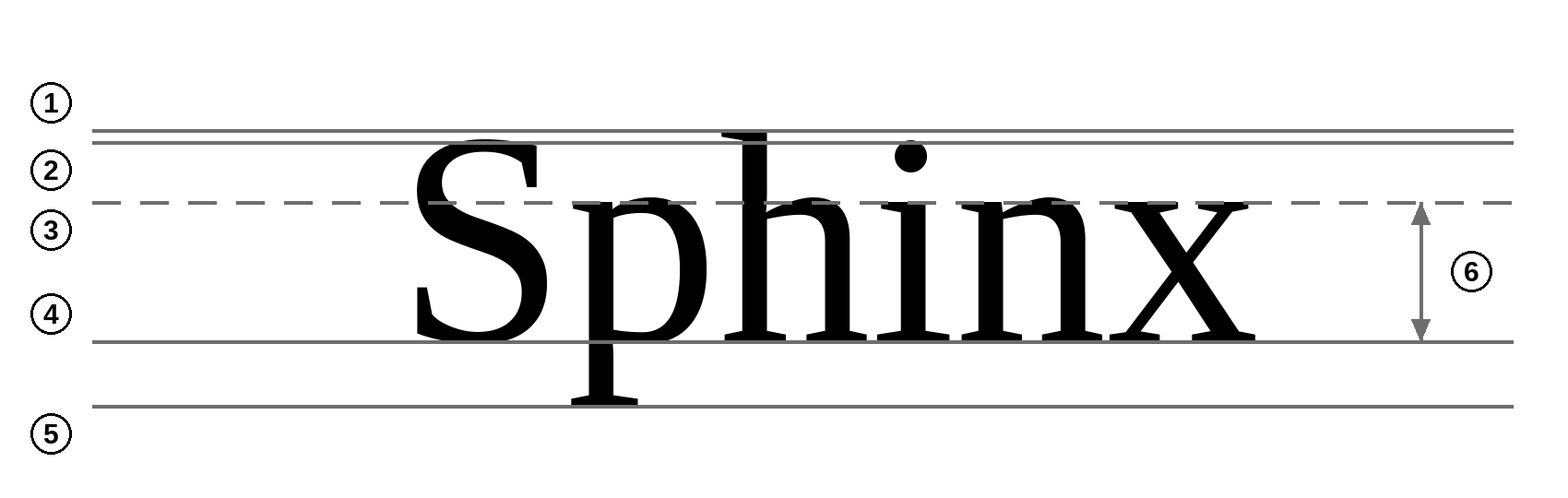
| No. | Term | What it means (my own words) | My swatch name | My line type and weight |
|---|---|---|---|---|
| Ascender | ||||
| Cap Height | ||||
| Mean Line (Median) | ||||
| Baseline | ||||
| Descender | ||||
| X-Height |
Part 4: Classification and Vocabulary (Day 3)
Fill in the typeface you used for each classification and one feature you can point to that proves it belongs in that class.
| Classification | Typeface I used | One feature that proves it (for example, thick/thin contrast) |
|---|---|---|
| Serif | ||
| Modern Serif | ||
| Slab Serif | ||
| Sans Serif | ||
| Script | ||
| Decorative |
Choose at least eight terms for your vocabulary block. Draft each definition here in your own words before you type it into InDesign.
| Term | My definition |
|---|---|
Part 5: Layout, Pairing, and Hierarchy (Day 4)
Record the typeface families you chose and why they work together.
| Typeface family | Why it works for this job | |
|---|---|---|
| Headline / Title | ||
| Body / Vocabulary text | ||
| Labels |
Part 6: Final Check and Self-Check (Day 5)
Check each box as you finish it.
Rate yourself from 1 (poor) to 5 (excellent) on each rubric category. Write one sentence of proof from your work.
| Rubric category | My score (1–5) | My proof |
|---|---|---|
| Document Setup | ||
| Workspace, Layers & Saving | ||
| Anatomy of Type: Guides & Labels | ||
| Typography Vocabulary & Classification | ||
| Character & Paragraph Formatting | ||
| Typeface Selection & Pairing | ||
| Layout, Grid & Hierarchy | ||
| Color, Effects & Visual Impact | ||
| Craft, Proofing & Output | ||
| Planning Worksheet & Timeliness |
Gallery walk: write two stars and a wish for three classmates’ posters. Use typography vocabulary.
| Poster by | Two stars and a wish |
|---|---|